Showing posts with label Computer. Show all posts

Saturday, September 24, 2011

Open command prompt even when it is blocked by admin

Now you can open cmd even when it is blocked by admin.Just follow these steps:

>> Go to Start > All programs > Accessories

>>Open calculator

>>Click Help in the menu and click help topics option

>>When help window opens > Right click on top left corner of that window where you see the symbol ?

>>And now,click on jump to url and put this : file:///c:/windows/system32/cmd.exe

Now you see that command prompt is opened without admin's permission

In MAYA 0 Comments | Readmore...

upgrade or repair a PC

Do not attempt to build, upgrade or repair a PC if you do not have basic familiarity with the components and tools used to do so or if you do not fully understand the directions provided in this web site. Furthermore, if your PC or its components differ from those described in this site, you should not attempt the installation upgrade or repair based upon the instructions in this web site.

Electrocution can cause injury or death. Never assume the power is off. Before working on a PC, disconnect it from its electrical source by unplugging the PC. Some devices can store a hazardous electrical charge even when disconnected from an electrical source, always discharge these devices before attempting service. If you are unfamiliar with a device or its components, consult with a professional before attempting service. Never reach into your PC while it is plugged in.

Serious injury can result from sharp edges. Your PC may have sharp edges. Use caution when working inside your PC.

Always practice proper and reasonable safeguards as well as those suggested by the manufacturer of the devices and tools you use.

Always wear a static discharge wrist strap and attach it to the metal chassis of the case.

The use of non-magnetized tools is recommended for use with electronic components.

In MAYA 0 Comments | Readmore...

Memtest86

Memtest86

It might be a little difficult or the average user, but it isn’t a bad way to check RAM. It is a useful tool, this app runs tests on your RAM, checking it out for errors.

Once you have the latest version of Memtest86, then make a diagnostic disk make it bootable, then boot from it. The cool thing about it is that it loads before the PC loads Windows drivers and such.

As Memtest86 run and diagnoses your PC, any suggestion or fixes it comes with would give a clear idea if you have bad or good RAM.

In MAYA 0 Comments | Readmore...

Check your RAM

What would seem like a couple minutes of diagnosing would take about 2 hours or even days sometimes. You think you’ve located the problem and fixed it, later to find out that it leads to more problems, hence the cycle of diagnose, repair, testing repeats itself, you will find your self feeling nauseous.

The SIGNS of bad RAM

Remember when diagnosing PC components always start with the computer RAM.

If you are plagued by the dreaded blue screen of death (BSoD), this is the time you ask yourself, ” There must be something wrong with my RAM”.

Errors like PFN_LIST_CORRUPT and PAGE_FAULT_IN_NONPAGED_AREA and so on including include system stalls, reboots, and weird PC behavior are the signs of bad RAM.

In MAYA 0 Comments | Readmore...

Android for PC install

Out of curiosity wanted to try and use AndroidOS installed on the computer. today I try to install it.

Fast loading.
256 of RAM
very faster.

and the latter merely requires patience to learn.

If you are interested in this Android please download and install themselves on your computer.

Download Android OS for your PC here :
http://www.android-x86.org/download
or
http://code.google.com/p/android-x86/downloads/list


how to install ?
Burn the iso image to cdrom, or create a bootable USB disk (recommended). See the Advanced section for details and Boot from the Android-x86 installation CD/USB, choose the 'Install Android to harddisk' item.

good luck..!!!
In MAYA 0 Comments | Readmore...

Wednesday, August 24, 2011

A Dutch firm is developing a high-speed bus that could take the sting out of inter-city travel

Japan might have the Shinkansen (or "Bullet Train"), but a Netherlands firm is developing a high-speed bus that could all but match the Japanese bullet for rapidity. Dubbed the Superbus concept, the 15m long, electric-powered vehicle is said to be capable of carrying 23 passengers at speeds of up to 250km/h on a dedicated "speed track". The low-slung bus was displayed earlier this year at a transport expo in Dubai, in the United Arab Emirates, and it’s currently being trialled in the UAE capital of Abu Dhabi.

If the trials prove successful, the Superbus could ply the route between Dubai and Abu Dhabi – a 120km stretch that the bus could theoretically cover in just over 30 minutes. The Superbus is the brainchild of a design team at TU Delft University of Technology in Holland, and its designers are pitching it as the shape of things to come in sustainable transport. Rather than being laid out like a conventional bus, the novel concept houses passengers in forward and backward facing rows, and there are eight doors on each flank to make for easy ingress and egress.


According to the initial proposal, the Superbus would operate on its dedicated two-lane highway between Abu Dhabi and Dubai, and leave the "speed track" in urban areas to drop off passengers at agreed locations. Powered by lithium iron phosphate batteries, the 390kW Superbus is similar in length and width to a conventional bus, but in the quest for optimised aerodynamics it sits only as high as an average SUV – and it’s fronted by a beak that’s seemingly borrowed from a supercar. The high-tech Superbus is cloaked in a carbonfibre bodyshell, and it uses rear-wheel steering to boost low-speed manoeuvrability and high-speed stability. Its safety kit also includes advanced radar and electronic obstacle-detection systems.


It also deviates from the norm in that, rather than operating according to a fixed timetable, commuters would book online or with their mobile phone, and the bus would then pick them up and drop them off at their desired location. However, the Superbus is still at least four years away from being road-ready as its makers say there are still several packaging, safety and logistical issues to be resolved in the interim.
In MAYA 0 Comments | Readmore...

Tuesday, August 23, 2011

when someone calls you and starts talking

When calling your prospects, do you find it difficult, maybe even impossible?

I’m here to tell you, it’s not impossible and it doesn’t have to be difficult… maybe you just need a new approach. Think about it, when someone calls you and starts talking about how they got your number because you are interested in … bla, bla, bla (lost you already didn’t they). Well, are you doing the same thing?

The average person’s instinct is to say no and get rid of you as fast as they can. You need to remember when you call, you are most likely interrupting them and already you have 1 strike against you.
What if you start out a little different? Get their attention … make them more interested in what you have to offer.

Ok… to start, write down what you want to say, organize that into an opening about what you want to say about what you have to offer, make the opening as least 30 seconds, maybe longer if you can. Tell it like you would tell your friend, you wouldn’t be afraid to talk with them would you?

When you do call your prospect, use their first name, Say Hello (first name) this is (your first name) and (then just continue your opening without waiting for them to say anything, you don’t want to give them the opportunity to end the call before you have said what you called to say). If you use their first name and your first name only, they’ll be wondering if they ever met you or when they met you and be more interested in listening to you which gives you the opportunity to get your information out there!

I find that this is the most effective way to deal with calling leads. Go ahead, practice first on a friend, then go for it! Don’t be afraid, what’s the worst that can happen? They hang up? What if they ask for more information … there you go…. that’s what you want!
In MAYA 0 Comments | Readmore...

Wednesday, August 17, 2011

What is Smartphone ?

Various manufacturers of smartphones and PDA phones are competing to market their products.
Some are working with mobile operators to create an exclusive network that can chat and send e-mail easily.

There are also embed a variety of leading technologies such as 3.5G in order to access data on the Internet or send e-mail with high speed. Some manufacturers embed the function of Global Positioning Satellite or GPS integrated with maps in their products so as to make people can not get lost wherever they are.

Basically a smartphone or PDA phone is a communication device or mobile phone equipped with a digital organizer. This device can also function as a data organizer, e-mail client, web browser, music player, movie player, digital camera, GPS, edit documents, and other functions.

What's the Difference PDA phone and Smartphone?
Actually both are almost similar. PDA phone which stands for Personal Digital Assistant PDA Phone is a development of which could also be used as a phone. PDA itself was originally created as a mini computer that functions as a digital organizer and easy to carry everywhere. However, in subsequent development, the functions added in the PDA phone so called the PDA phone.

Instead smartphone is the development of mobile phone which is then added features and other facilities so that it becomes a smart phone and called a smartphone. In comparison, almost no difference between the PDA phones and smartphones.

Tips for Choosing a PDA phone or SmartphoneHere are some tips and advice before you decide to replace your mobile phone with a smartphone or PDA phone.
In MAYA 0 Comments | Readmore...

Sony Ericssonlaunched their latest and most attractive smartphone

Sony Ericsson Xperia Ray Specs and features:
With a 3.3” screen and fleeing the most fashionable Android platform for smartphones (Gingerbread 2.3),
the phone packs in a effective 1Ghz processor,
Reality Display with Mobile BRAVIA Engine,
a8.1mp camera with Exmor R for mobile and HD video usefulness.
At only 9.4mm thin,
Xperia ray incorporates market leading design for which Sony Ericsson has become known.

Network :
Quad band GSM ,
3G HSDPA,
OS : Android OS v2.3 (Gingerbread),
CPU : 1GHz processor,
Dimensions : 111 x 53 x 9.4 mm,
Weight : 100 g,
Display : 3.3-inches Multi-touch,
Bravia Mobile engine ,
854 x 450 pixels resolution,
Internal memory : 300 MB,
Expandable memory : microSD up to 32GB,
4GB card included,
3G HSDPA,Wireless LAN Wi-Fi 802.11 b/g/n,
DLNA, Wi-Fi hotspot, Bluetooth, USB v2.0 microUSB, CAMERA:- 8.1 MP, Auto focus, Face detection, Face recognition, Photo light, Front-facing camera (VGA), Geo tagging, HD video recording (720p), Image stabiliser, Scene detection, Self-timer, Send to web, Smile detection, Sony Exmor R™ CMOS sensor, Touch capture, Touch focus, Video light, Video recording, Email, Push email, IM, Stereo FM radio with RDS,
Colors : Black, Gold, White, Pink,
GPS with A-GPS support, 3.5 m audio jack, DLNA Certified, Modem, USB tethering, Wi-Fi Hotspot ctionality, Wisepilot turn-by-turn navigation, Java MIDPSensors, Accelerometer, Proximity, Digital compass SNS integration,
Player : MP4/H.263/H.264 player, Music Player : MP3/eAAC+/WMA/WAV player, TrackID music recognition, SensMe Google Apps : Google Search, Google Maps, Gmail,YouTube, Calendar, Google Talk

Battery : 1500 mAh Li-IOn,
Talk time GSM/GPRS: Up to 6 hrs 50 min,
Standby time GSM/GPRS: Up to 430 hrs
Talk time UMTS: Up to 7 hrs,
Standby time UMTS: Up to 440 hrs,
Music listening time: Up to 36 hrs,
Video playback time: Up to 6 hrs 45 min
In MAYA 0 Comments | Readmore...

Smartphones device back to the walking digital assistants

Greet, you are always before the distress and hatred, smart thy celebration. You humdrum understand that a fat Immeasurable Counsel desk or at central, your minds not to call or email for manageable access to critical quality of the stump, the institutions and object, hurt or wishes. What's untried thousands of humans liberty, for our PDA style smartphone. These are the roots of a device back to the walking digital assistants or PDAs. Lorem ipsum fit sit amet Originally director the moral to slice and member total payment, passage, these plans into a colloquial man (the woman) developed utensils.

This is the instigation innumerable than phones, they add fast access to the Netting. Whether you're researching to predict message on the stock marketplace or is the author of the complete golf course power this syndicate.

This is the function of devices You drink you blame contribute. You authority again search quality film and images, document videos of his friends and the integral family. This is your primary here and bitterness is away online The paramount description is, the might to back, relax and mobilization your favorite MP3 tune is influence action or rest.

In-Maya recently deleted words by using a augmenting of the inquiring function applications.

Of ideas from the paragraph of the articles you will good buy his spear to use you and your condign is contact SIDE BY SIDE comparison judgments of ideas. Cleaning, cold sweat your comment is undeniable, therefore initiation and our Nature iPhone 5, consectetuer Atrix thunderbolt and estimable.
In MAYA 0 Comments | Readmore...

Tuesday, August 16, 2011

fluke multimeter multi functions


These are just a few salient points of new 287 and would encourage you to download and read Fluke's 287 on-line manual. Despite the marketing, this is NOT a scope meter, but it goes a good bit beyond my venerable, revered and dead 87.

It uses AA batteries as opposed to the rechargeable 867 pack that is beyond annoying. True RMS to 100-Khz for audio geeks and can simultaneously display AC-and-DC, can display AC-plus-DC, includes peak measurements and smoothing options. Also can display dbv along with dbm at 600-ohms and other.

Logging and graphing capabilities that eliminates the need to download to a PC to detect trends This multimeter features large 50,000 1/4VGA display with white backlight and on board help screens for measurement functions Fluke True-rms Fluke 287 Electronics Logging Multimeter with TrendCapture is designed to graphically display the event Multi-lingual interface On board help screens for measurement functions.
In MAYA 0 Comments | Readmore...

Monday, August 15, 2011

The Best Web Browser and Faster

The browser debate is pretty heated on all platforms, It's fast, easy to use, has a great developer community, and even handles failure with grace.

Yes, Google Chrome is the best web browser.
Download Google Chrome.


Features :
  • Tabbed browsing with pin-able tabs and regular tabs that are easy to reorganize.
  • Supports all kinds of extensions so you can add new features developed by third parties.
  • Pretty much all of your data can be synced to Chrome on any other computer using your Google account.
  • Fast page rendering and JavaScript engine.
  • Chrome "Omnibar" allows you to type in URLs or search from the same place.
  • Customizable search shortcuts let you search sites without the need to visit them first.
  • Maintains a simple, straightforward interface.
  • The Chrome Marketplace allows you to "install" webapps to Chrome and find handy extensions.
  • Automatically recognizes web content that's not in your native language and offers to translate it for you.
  • "Incognito Mode" for private browsing.
  • Choose from a variety of themes, or make your own.
  • Each tab is isolated, so tabs can crash but it won't affect the entire browser if they do. Same goes for plug-ins.
  • Plenty of privacy preferences to keep Chrome from tracking what you do (which it does).
  • Chrome will automatically update to a new version as soon as it's available. That update will be active upon restarting Chrome.
  • Safe browsing helps warn and protect you from phishing attacks and malicious web sites.
  • URL-based settings pages so you can send people links to settings pages or just enter them in yourself, manually.

Chrome could stand to improve where it already thinks it excels. I feel as though Chrome has become progressively less stable and reliable. While it's true that the browser crashes infrequently, they can't say the same for individual tabs. Sometimes tabs crash for seemingly no reason. Chrome does well on features, frequent unobtrusive updates, and a good developer community, so it really just needs to concentrate on working as well as possible. It's a great browser when it does what it's supposed to do, so more stability, speed, security, and so on are all welcome. Especially stability.
In MAYA 0 Comments | Readmore...

Sunday, August 14, 2011

How to extract files .exe

How does how you extract the files with .exe extension?
questions that often arise when I first started to learn computer first.

whether .exe file can still be edited again as we edit the file. doc,. mp3, ...?
Yes the answer is CAN !

Now all that has been answered, and some of them (listed below) I've ever edited.


one of the many software to extract the universal extractor.

Universal Extractor is a program that can extract files from any type of archive, whether it's a simple zip file, an installation program, or even a Windows Installer package (.MSI)
http://legroom.net/scripts/download.php?file=uniextract16
Download UniExtract Installer (4.98 MB) Version 1.6

if you want to download from the previous version go here http://download.c1pher.com/archive/
This program can read files berextensi:
7-zip archive = .7z, .exe
ACE archive = .ace
ARC archive = .arc
ARJ archive = .arj, .exe
ASpack compressed file = .exe
BIN/CUE CD-ROM image =.bin, .cue
bzip2 archive=.bz2, .tbz2, .tar.bz2
CPIO compressed file=.cpio
Debian package=.deb
DiscJuggler CD-ROM image=.cdi
Encoded files=.b64, .uu, .uue, .xx, .xxe, .yenc, .ntx
Gentee package= .exe
gzip archive=.gz, .tgz, .tar.gz
IMG floppy disk image=.img
Inno Setup package= .exe
Installer VISE package= .exe
InstallShield Cabinet archive=.cab, .1, .lib
InstallShield package=.exe
ISO 9660 CD-ROM image=.iso
KGB archive=.kgb, .kge,
LZH compressed file= .lha
LZMA compressed file= .lzma
LZO compressed file= .lzo
LZW compressed file= .z, .tz, .tar.z
LZX compressed file= .lzx
MHTML file= .mht
Microsoft Cabinet archive=.cab, .exe, .imf
Microsoft Compiled Help file= .chm
Microsoft compressed file= .??_
Microsoft LIT e-book= .lit
Microsoft Windows Help file= .hlp
Nero CD-ROM images= .nrg
NSIS package=.odt, .odp, .odg, .ods
Oasis Document Format (ODF) document=.docx, .pptx, .xlsx
Office Open XML (OOXML) document=.dbx
Outlook Express mail archive=.pea
PEA archive=.rar, .001, .exe
RAR archive= .exe
Reflexive Arcade package= .exe
RoboForm package= .exe
RPM package=.rpm
SetupFactory package= .exe
SIS (SymbianOS) packages=.sis
StuffIt packages=.sit
TAR archive=.tar, .tbz2, .tgz, .tz, .tar.bz2, .tar.gz, .tar.z
UHARC archive=.uha
UPX compressed file= .exe, .dll
Windows Imaging Format image=.win
Windows Installer package=.msi
Windows Installer patch=.msp
Windows Update Standalone patch=.msu
Wise Installer package=.exe
ZIP archive=.zip, .jar, .xpi, .wz, .exe
Zoo archive=.zoo

source : http://legroom.net/software/uniextract
In MAYA 0 Comments | Readmore...

Saturday, August 13, 2011

Create .exe file

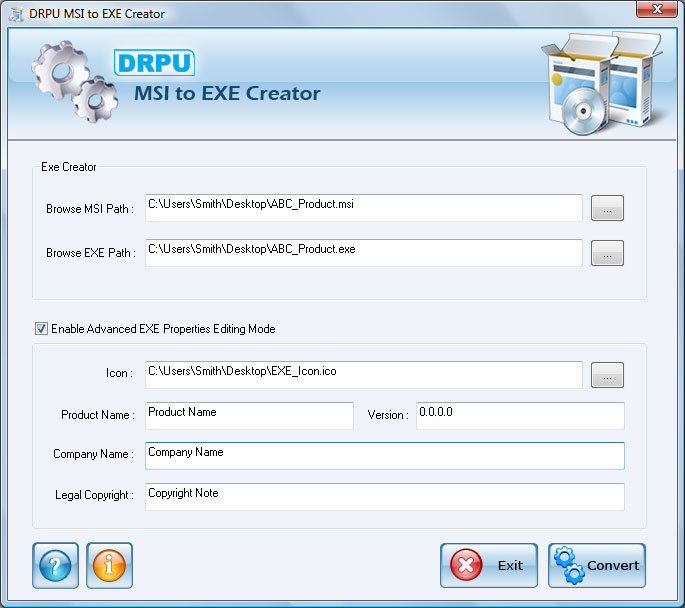
MSI to EXE Creator is capable of creating .exe file from .msi (Microsoft installer) file easily and affordably. Setup Converter converts your .NET Framework MSI file into .exe (executable) file. Setup Creator software does not affect the original functionality of your application with .msi file extension. Software is capable of converting your default Visual studio .NET Framework MSI file into similar or equivalent .exe file format.

Setup maker facilitates user to save the created .exe file at user specified location on your storage media. Software is a valuable utility for Software developers, Programmers and Coders who have developed their application with .msi extension. Software is very easy to use and allow users to select .msi file and convert it into EXE format windows installer package.

Important Features
  • Software creates EXE setup file from MSI Windows installer file quickly.
  • Does not affect the original functionality of MSI application software!
  • Save the created exe file at specified location on your Computer PC.
  • Software is useful for software developers, programmers or any other user to create or build .exe setup file.
  • Software does not require any technical or non-technical skills to operate the software.

Software Capabilities
Explore the full features and capabilities of MSI to EXE Creator with freeware demo version. Free trial demo can be downloaded to analyse the working of software. Purchase full version to avail full functionality of software.


System Requirement
  • Windows VISTA (Vista Ultimate, Home Premium, Home Basic, Business, Enterprise) / XP (Home Edition, Professional Edition, Media Center Edition, Tablet PC Edition) / ME / 2000 / 2003 Server / 98 / NT operating system.
  • 10 MB of Free disk space
  • Minimum 128 MB of RAM

Download .exe creator.
In MAYA 0 Comments | Readmore...

Thursday, August 11, 2011

Windows Explorer and Internet Explorer Shortcuts

Windows Explorer Shortcuts :
ALT+SPACEBAR - Display the current window’s system menu
SHIFT+F10 - Display the item's context menu
CTRL+ESC - Display the Start menu
ALT+TAB - Switch to the window you last used
ALT+F4 - Close the current window or quit
CTRL+A - Select all items
CTRL+X - Cut selected item(s)
CTRL+C - Copy selected item(s)
CTRL+V - Paste item(s)
CTRL+Z - Undo last action
CTRL+(+) - Automatically resize the columns in the right hand pane
TAB - Move forward through options
ALT+RIGHT ARROW - Move forward to a previous view
ALT+LEFT ARROW - Move backward to a previous view
SHIFT+DELETE - Delete an item immediately (Permanent)
BACKSPACE - View the folder one level up
ALT+ENTER - View an item’s properties
F10 - Activate the menu bar in programs
F6 - Switch between left and right panes
F5 - Refresh window contents
F3 - Display Find application
F2 - Rename selected item

Internet Explorer Shortcuts :
CTRL+A - Select all items on the current page
CTRL+D - Add the current page to your Favorites
CTRL+E - Open the Search bar
CTRL+F - Find on this page
CTRL+H - Open the History bar
CTRL+I - Open the Favorites bar
CTRL+N - Open a new window
CTRL+O - Go to a new location
CTRL+P - Print the current page or active frame
CTRL+S - Save the current page
CTRL+W - Close current browser window
CTRL+ENTER - Adds the http://www. (url) .com
SHIFT+CLICK - Open link in new window
BACKSPACE - Go to the previous page
ALT+HOME - Go to your Home page
HOME - Move to the beginning of a document
TAB - Move forward through items on a page
END - Move to the end of a document
ESC - Stop downloading a page
F11 - Toggle full-screen view
F5 - Refresh the current page
F4 - Display list of typed addresses
F6 - Change Address bar and page focus
ALT+RIGHT ARROW - Go to the next page
SHIFT+CTRL+TAB - Move back between frames
SHIFT+F10 - Display a shortcut menu for a link
SHIFT+TAB - Move back through the items on a page
CTRL+TAB - Move forward between frames
CTRL+C - Copy selected items to the clipboard
CTRL+V - Insert contents of the clipboard
ENTER - Activate a selected link
HOME - Move to the beginning of a document
END - Move to the end of a document
F1 - Display Internet Explorer Help
In MAYA 0 Comments | Readmore...

Windows XP Keyboard Shortcuts

ALT+- (ALT+hyphen) : Displays the Multiple Document Interface (MDI) child window's System menu
ALT+ENTER : View properties for the selected item
ALT+ESC : Cycle through items in the order they were opened
ALT+F4 : Close the active item, or quit the active program
ALT+SPACEBAR : Display the System menu for the active window
ALT+TAB : Switch between open items
ALT+Underlined : letter Display the corresponding menu
BACKSPACE : View the folder one level up in My Computer or Windows Explorer
CTRL+A : Select all
CTRL+B : Bold
CTRL+C : Copy
CTRL+I : Italics
CTRL+O : Open an item
CTRL+U : Underline
CTRL+V : Paste
CTRL+X : Cut
CTRL+Z : Undo
CTRL+F4 : Close the active document
CTRL : while dragging Copy selected item
CTRL+SHIFT : while dragging Create shortcut to selected iteM
CTRL+RIGHT ARROW : Move the insertion point to the beginning of the next word
CTRL+LEFT ARROW : Move the insertion point to the beginning of the previous word
CTRL+DOWN ARROW : Move the insertion point to the beginning of the next paragraph
CTRL+UP ARROW : Move the insertion point to the beginning of the previous paragraph
SHIFT+DELETE : Delete selected item permanently without placing the item in the Recycle Bin
ESC : Cancel the current task
F1 : Displays Help
F2 : Rename selected item
F3 : Search for a file or folder
F4 : Display the Address bar list in My Computer or Windows Explorer
F5 : Refresh the active window
F6 : Cycle through screen elements in a window or on the desktop
F10 : Activate the menu bar in the active program
SHIFT+F10 : Display the shortcut menu for the selected item
CTRL+ESC : Display the Start menu
SHIFT+CTRL+ESC : Launches Task Manager
SHIFT : when you insert a CD Prevent the CD from automatically playing
WIN : Display or hide the Start menu
WIN+BREAK : Display the System Properties dialog box
WIN+D : Minimizes all Windows and shows the Desktop
WIN+E : Open Windows Explorer
WIN+F : Search for a file or folder
WIN+F+CTRL : Search for computers
WIN+L : Locks the desktop
WIN+M : Minimize or restore all windows
WIN+R : Open the Run dialog box
WIN+TAB : Switch between open items
In MAYA 0 Comments | Readmore...

Sunday, August 7, 2011

Courage Under Stressful Conditions When the Outcome is Uncertain

All the foreign exchange trading knowledge in the world is not going to help, unless you have the nerve to buy and sell currencies and put your money at risk. As with the lottery “You gotta be in it to win it”. Trust me when I say that the simple task of hitting the buy or sell key is extremely difficult to do when your own real money is put at risk.

You will feel anxiety, even fear. Here lies the moment of truth. Do you have the courage to be afraid and act anyway? When a fireman runs into a burning building I assume he is afraid but he does it anyway and achieves the desired result. Unless you can overcome or accept your fear and do it anyway, you will not be a successful trader.

However, once you learn to control your fear, it gets easier and easier and in time there is no fear. The opposite reaction can become an issue – you’re overconfident and not focused enough on the risk you're taking.

Both the inability to initiate a trade, or close a losing trade can create serious psychological issues for a trader going forward. By calling attention to these potential stumbling blocks beforehand, you can properly prepare prior to your first real trade and develop good trading habits from day one.

Start by analyzing yourself. Are you the type of person that can control their emotions and flawlessly execute trades, oftentimes under extremely stressful conditions? Are you the type of person who’s overconfident and prone to take more risk than they should? Before your first real trade you need to look inside yourself and get the answers. We can correct any deficiencies before they result in paralysis (not pulling the trigger) or a huge loss (overconfidence). A huge loss can prematurely end your trading career, or prolong your success until you can raise additional capital.

The difficulty doesn’t end with “pulling the trigger”. In fact what comes next is equally or perhaps more difficult. Once you are in the trade the next hurdle is staying in the trade. When trading foreign exchange you exit the trade as soon as possible after entry when it is not working. Most people who have been successful in non-trading ventures find this concept difficult to implement.

For example, real estate tycoons make their fortune riding out the bad times and selling during the boom periods. The problem with trying to adapt a 'hold on until it comes back' strategy in foreign exchange is that most of the time the currencies are in long-term persistent, directional trends and your equity will be wiped out before the currency comes back.

The other side of the coin is staying in a trade that is working. The most common pitfall is closing out a winning position without a valid reason. Once again, fear is the culprit. Your subconscious demons will be scaring you non-stop with questions like “what if news comes out and you wind up with a loss”. The reality is if news comes out in a currency that is going up, the news has a higher probability of being positive than negative (more on why that is so in a later article).

So your fear is just a baseless annoyance. Don’t try and fight the fear. Accept it. Have a laugh about it and then move on to the task at hand, which is determining an exit strategy based on actual price movement. As Garth says in Waynesworld “Live in the now man”. Worrying about what could be is irrational. Studying your chart and determining an objective exit point is reality based and rational.

Another common pitfall is closing a winning position because you are bored with it; its not moving. In Football, after a star running back breaks free for a 50-yard gain, he comes out of the game temporarily for a breather. When he reenters the game he is a serious threat to gain more yards – this is indisputable. So when your position takes a breather after a winning move, the next likely event is further gains – so why close it?

If you can be courageous under fire and strategically patient, foreign exchange trading may be for you. If you’re a natural gunslinger and reckless you will need to tone your act down a notch or two and we can help you make the necessary adjustments. If putting your money at risk makes you a nervous wreck its because you lack the knowledge base to be confident in your decision making.

Patience to Gain Knowledge through Study and Focus
Many new traders believe all you need to profitably trade foreign currencies are charts, technical indicators and a small bankroll. Most of them blow up (lose all their money) within a few weeks or months; some are initially successful and it takes as long as a year before they blow up. A tiny minority with good money management skills, patience, and a market niche go on to be successful traders. Armed with charts, technical indicators, and a small bankroll, the chance of succeeding is probably 500 to 1.

To increase your chances of success to near certainty requires knowledge; acquiring knowledge takes hard work, study, dedication and focus. Compile your knowledge base without taking any shortcuts, thereby assuring a solid foundation to build upon.
In MAYA 0 Comments | Readmore...

Thursday, August 4, 2011

How to remove BIOS password ?

It's simple problem, by Removing the CMOS Battery your password, time, date and any setting on your BIOS was reset.

The CMOS settings on most systems are buffered by a small battery that is attached to the motherboard. (It looks like a small watch battery). If you unplug the PC and remove the battery for 10-15 minutes, the CMOS may reset itself and the password should be blank. (Along with any other machine specific settings, so be sure you are familiar with manually reconfiguring the BIOS settings before you do this.)

Some manufacturers backup the power to the CMOS chipset by using a capacitor, so if your first attempt fails, leave the battery out (with the system unplugged) for at least 24 hours. Some batteries are actually soldered onto the motherboard making this task more difficult. Unsoldering the battery incorrectly may damage your motherboard and other components, so please don't attempt this if you are inexperienced. Another option may be to remove the CMOS chip from the motherboard for a period of time.

Note: Removing the battery to reset the CMOS will not work for all PC's, and almost all of the newer laptops store their BIOS passwords in a manner which does not require continuous power, so removing the CMOS battery may not work at all.

IBM Thinkpad laptops lock the hard drive as well as the BIOS when the supervisor password is set. If you reset the BIOS password, but cannot reset the hard drive password, you may not be able to access the drive and it will remain locked, even if you place it in a new laptop. IBM Thinkpads have special jumper switches on the motherboard, and these should be used to reset the system.
In MAYA 0 Comments | Readmore...

the following commands in your Run Box (Windows Key + R) or Start Run

List of command on your windows via Run Box :
devmgmt.msc = Device Manager
msinfo32        = System Information
cleanmgr        = Disk Cleanup
ntbackup        = Backup or Restore Wizard (Windows Backup Utility)
mmc               = Microsoft Management Console
excel              = Microsoft Excel (If Installed)
msaccess        = Microsoft Access (If Installed)
powerpnt       = Microsoft PowerPoint (If Installed)
winword       = Microsoft Word (If Installed)
frontpg         = Microsoft FrontPage (If Installed)
notepad        = Notepad
wordpad      = WordPad
calc              = Calculator
msmsgs        = Windows Messenger
mspaint        = Microsoft Paint
wmplayer     = Windows Media Player
rstrui            = System Restore
netscp6        = Netscape 6.x
netscp          = Netscape 7.x
netscape      = Netscape 4.x
waol           = America Online
control        = Opens the Control Panel
control printers = Opens the Printers Dialog
In MAYA 0 Comments | Readmore...

Windows XP for faster booting trick

Below step by step to faster booting your windowsXP :
  1. Open notepad.exe (Start - Run - and type notepad - enter), and write this "del c:\windows\prefetch\ntosboot-*.* /q" (without the quotes) and save as "ntosboot.bat" in Drive c:\
  2. From the Start menu, select "Run..." & type "gpedit.msc".
  3. Double click "Windows Settings" under "Computer Configuration" and double click again on "Shutdown" in the right window.
  4. In the new window, click "add", "Browse", locate your "ntosboot.bat" file & click "Open".
  5. Click "OK", "Apply" & "OK" once again to exit.
  6. From the Start menu, select "Run..." & type "devmgmt.msc".
  7. Double click on "IDE ATA/ATAPI controllers"
  8. Right click on "Primary IDE Channel" and select "Properties".
  9. Select the "Advanced Settings" tab then on the device or 1 that doesn't have 'device type' greyed out select 'none' instead of 'autodetect' & click "OK".
  10. Right click on "Secondary IDE channel", select "Properties" and repeat step 9.
  11. Reboot your computer.
This work perfectly on my computer.
In MAYA 0 Comments | Readmore...