Showing posts with label Tips. Show all posts

Thursday, September 29, 2011

Basically two possible situations of the party

It all starts with a detailed mental image of the party itself: the number of people you plan to invite, the location, the food and drinks, music, and any entertainment activities you might want to include. Identify the separate steps you need to do and find out how long each of them will take. Also, design a sequence for all these steps. When all this is planned in detail, you’ll know exactly how much time you’ll need for the preparations.

There are basically two possible situations: you know the date of the party, in which case you should start counting back from that day to determine when you should start the preparations; or you know when you are free to start taking care of the arrangements and you set the date according to that. party with me :D

Whichever situation may apply, you need to give yourself deadlines for each aspect of the party you need to polish off.

Be strict with your deadlines and allow two to three days lead time for each in case something goes awry. That way, you’ll not only have an enjoyable party, but also a pleasant preparation.
In MAYA 0 Comments | Readmore...

Wednesday, September 28, 2011

Have a party until you welcome the first guest

While it is true that the success of a party depends on many different factors, some of which are independent of you, there are also aspects that you, as the organizer, have complete control over. Logically, these aspects concern the preparation phase, everything you do from the moment you decide to have a party until you welcome the first guest.

One of your number one concerns will be that of being ready in time. Let’s see just how difficult or easy that can be.

Though there are party service providers that can do everything for you, many people might prefer to take care of the preparations themselves and use the money thus saved to increase the party budget. That requires, however, good time management.
In MAYA 0 Comments | Readmore...

Tuesday, September 27, 2011

Before the party starts

Select a unique setting for the party. Anything that is unique can be interesting and well liked by most people. Make sure to decorate the place as best as possible. It is also best to choose a party venue that guests can easily find. Inform your guests well in advance when and where the party will be held as well as the time and any dress code. It is best to give printed party invitations when inviting your guests. Relying on oral invitation may not work as it can be easily forgotten and does not provide enough information about the party.

Before the party starts, check that everything is in its proper place -- this includes cake, the food, the drinks and the gifts. As the host of the party, be at the reception area to welcome arriving guests. When the party is in full swing, remember to circulate among the guests. The perfect host goes around making sure all guest are as comfortable as they can be.

To make the party more interesting, plan a few fun games. Give prizes for winners. If entire families are invited, make sure to conduct fun games for adults and children separately. And finally, never fail to say good bye and thanks to the guest as they leave the party.
In MAYA 0 Comments | Readmore...

Monday, September 26, 2011

Even in throwing a party

In any project, the first step is always the hardest. However, once you overcome the first step, everything will fall into place. Well, not all the time. Things can still be topsy-turvy even if you’ve outlined the things to make your fantastic idea a reality for in-maya.

Even in throwing a party, all the preparations needed can leave you cursing this responsibility. Relieve yourself from agony and stop being a martyr. Holler for a friend or two to be your aide. Not to worry about who’ll take the credits because you’ll be playing boss here. Pretend that you have your own events company. Having friends around will save you from over milking your brain for ideas.

Brainstorming is a great way to pool in creative approaches to a problem. Share your ideas and highlight the complexities. Be open to extreme propositions. Facilitate and lead them to what you want to achieve. After you come up with brilliant and feasible suggestions, designate the tasks. Logistics is the main dirty work. One of the tedious jobs in hosting a party is selecting your guests. This job also involves making the invitations and double-checking their contact information.

Next to that is arranging the venue. Even if it is your home, you will still have to consider its availability on the targeted date of the party. What if your roommate’s folks are visiting on that day? Include alternative party venues in your brainstorming, so are emergency protocols if the unimaginable happened. Ask your team to report the progress of their assignments. If you only have one partner, then equally divide the tasks and regularly consult each other. With a team, everyone can truly enjoy a great party.
In MAYA 0 Comments | Readmore...

thing you need is a functioning camera

Whether you use a digital camera or a traditional camera, there are some basic steps you can take to make sure that the party pictures turn out. The first thing you need is a functioning camera. If your camera runs on batteries, make sure the batteries are fully charged or that you have extra ones on hand. Taking party pictures works best when you can capture the moment and if your batteries are dead, the moment will pass.

You also need to have enough storage space for your photos. This means an extra memory card if you are going digital or extra film for the traditional camera. For people who do not use their cameras often, sometimes problems with the camera do not become apparent until they are at the party and ready to take pictures. This is not the time to find out that the lens is dirty or that the buttons stick. Check the camera out the day before the party so that you have time to clean it up and make sure everything is running perfectly. Most digital cameras have a built in flash. Make sure that you know how to use it. If you are using a traditional camera, bring your flash unit.

The most important hint for party picture taking is to safeguard your equipment. You will be partying too and it is too easy to set the camera down while getting a drink or something to eat. It is also too easy for someone to knock the camera off the table (or wherever you set it) or for someone to spill something on it. Either have a little carry case you can hang around your neck or a bag you store it in a safe place
In MAYA 0 Comments | Readmore...

Sunday, September 25, 2011

Stop smoking tips


quit smoking?

how to stop smoking?
what medications to stop smoking?
The most efficacious drug to quit smoking?

look at the picture above, and think that you have in the photo.

just tips.
In MAYA 0 Comments | Readmore...

tips to follow to ensure the success of the event

When planning a party, here are some useful party tips to follow to ensure the success of the event.

  • Carefully select the party venue. If you are expecting a lot of guests, your house may not accommodate them. You may also have a problem with parking. So unless you are going to hold a small party, find a venue that can accommodate your guests.
  • Rent the party venue. Make sure the location matches the theme of your party. For example, if you are going to host a party with an animal theme, inquire about the possibility of holding the party in or near a zoo.
  • Invite your guests as early as possible. Refrain from last minute invitations. Your guests have to be informed of the time, place and directions to the party must be very clear. As much as possible, when renting a venue, make sure the site is convenient for your guests to reach. Scheduling your party on a weekend is best.
  • Decorate the party place accordingly. Make sure the decoration is nicely done. Make sure seating arrangements for the guests are properly marked to avoid confusion and embarrassing moments.
  • While doing the party preparation, write down every thing on a notebook so you can refer to your notes and check off those you have accomplished and those that still need to be done. Make sure the food list is complete including ingredients and condiments.
  • Prepare the guest list, list of gifts, decorative items in advance. Last minute, unplanned purchases will surely get you in trouble. It is recommended that you write down your list of things to do because you will definitely forget some essential items.
  • To make the party a great success, have games and ice breakers. Give simple prizes for the winners of parlor games and do not forget the camera to freeze the funny moments for posterity. Do not forget to give the gifts to your guests before they leave.
In MAYA 0 Comments | Readmore...

Saturday, September 24, 2011

Open command prompt even when it is blocked by admin

Now you can open cmd even when it is blocked by admin.Just follow these steps:

>> Go to Start > All programs > Accessories

>>Open calculator

>>Click Help in the menu and click help topics option

>>When help window opens > Right click on top left corner of that window where you see the symbol ?

>>And now,click on jump to url and put this : file:///c:/windows/system32/cmd.exe

Now you see that command prompt is opened without admin's permission

In MAYA 0 Comments | Readmore...

Tuesday, August 23, 2011

when someone calls you and starts talking

When calling your prospects, do you find it difficult, maybe even impossible?

I’m here to tell you, it’s not impossible and it doesn’t have to be difficult… maybe you just need a new approach. Think about it, when someone calls you and starts talking about how they got your number because you are interested in … bla, bla, bla (lost you already didn’t they). Well, are you doing the same thing?

The average person’s instinct is to say no and get rid of you as fast as they can. You need to remember when you call, you are most likely interrupting them and already you have 1 strike against you.
What if you start out a little different? Get their attention … make them more interested in what you have to offer.

Ok… to start, write down what you want to say, organize that into an opening about what you want to say about what you have to offer, make the opening as least 30 seconds, maybe longer if you can. Tell it like you would tell your friend, you wouldn’t be afraid to talk with them would you?

When you do call your prospect, use their first name, Say Hello (first name) this is (your first name) and (then just continue your opening without waiting for them to say anything, you don’t want to give them the opportunity to end the call before you have said what you called to say). If you use their first name and your first name only, they’ll be wondering if they ever met you or when they met you and be more interested in listening to you which gives you the opportunity to get your information out there!

I find that this is the most effective way to deal with calling leads. Go ahead, practice first on a friend, then go for it! Don’t be afraid, what’s the worst that can happen? They hang up? What if they ask for more information … there you go…. that’s what you want!
In MAYA 0 Comments | Readmore...

Wednesday, August 17, 2011

What is Smartphone ?

Various manufacturers of smartphones and PDA phones are competing to market their products.
Some are working with mobile operators to create an exclusive network that can chat and send e-mail easily.

There are also embed a variety of leading technologies such as 3.5G in order to access data on the Internet or send e-mail with high speed. Some manufacturers embed the function of Global Positioning Satellite or GPS integrated with maps in their products so as to make people can not get lost wherever they are.

Basically a smartphone or PDA phone is a communication device or mobile phone equipped with a digital organizer. This device can also function as a data organizer, e-mail client, web browser, music player, movie player, digital camera, GPS, edit documents, and other functions.

What's the Difference PDA phone and Smartphone?
Actually both are almost similar. PDA phone which stands for Personal Digital Assistant PDA Phone is a development of which could also be used as a phone. PDA itself was originally created as a mini computer that functions as a digital organizer and easy to carry everywhere. However, in subsequent development, the functions added in the PDA phone so called the PDA phone.

Instead smartphone is the development of mobile phone which is then added features and other facilities so that it becomes a smart phone and called a smartphone. In comparison, almost no difference between the PDA phones and smartphones.

Tips for Choosing a PDA phone or SmartphoneHere are some tips and advice before you decide to replace your mobile phone with a smartphone or PDA phone.
In MAYA 0 Comments | Readmore...

Tuesday, August 16, 2011

How can one find the best auto insurance for a classic car?

Is it even possible to find cheap antique car insurance? Classics cars can be well worth the sometimes pricey cost of upkeep and storage - there is no need to have to pay more for insurance coverage than necessary. Read on to learn some of the things that you should know before you purchase a classic car auto insurance policy.

Who hasn't turned their head while driving down the road to get a better look at a classic or collectible car? We're enamored with the lines of the car as well as its pristine condition. But the detailed attention in maintaining a classic car's flawless appearance and operation is not only to draw admiring looks, it is also necessary in order to keep up the market value of the car. For this reason, along with others, specialized classic auto insurance policies were developed to meet the needs of classic and collectible car owners.

Another reason (a very important reason), for insuring your vehicle as a classic or collectible is the greatly reduced cost of classic car insurance relative to standard auto insurance. Standard auto insurance can cost as much as 200%-300% more than classic auto insurance.

So, what is the biggest factor that causes such a great disparity in price between classic auto insurance and standard car insurance? Generally, collector vehicles are driven on a limited basis (the garage is where they are usually found). As a result, the risk of accident and loss to collector vehicles is considerably lower than the risk involved in vehicles that are regularly driven.
In MAYA 0 Comments | Readmore...

make a better decision on the insurance package

Getting cheapest car insurance online is a more practical option as it is more convenient and straightforward. Understanding the types of coverage can help you make a better decision on the insurance package.
  • Liability: This is the most important type of insurance coverage. It pays for all damages in an accident - of the insured person as well as others who got injured in the accident. It covers bodily injury and property damages. For instance, if the "insured" hits someone on the road, this type of insurance can cover medical expenses, and property damage of the "insured" and the victim. Plus, it also covers defense and court expenses.
  • Medical payments: It covers only the medical expenses (up to a specific limit) not considering fault in case of an accident. However, it covers the "insured", and his/her family members.
  • Uninsured motorist: It is short term auto insurance online. If an uninsured or unidentified person causes the accident and flees away, then the victim can avail uninsured motorist coverage to pay for the cars damages.
  • Collision:Covers the damages caused to the car in case of an accident.
  • Comprehensive: Covers the damages caused to the car in cases other than accidents like theft, fire, natural calamities, etc.
  • Rental reimbursement: It pays for a rental car if the vehicle of the "insured" is damaged and under repair.
Insurance may seem like money going down the drain. However, its true value will be realized when a person incurs great losses during an accident or theft. So, it is advisable not to wait for such a catastrophe to realize the importance of insurance coverage. And for people who are looking for cheap car insurance, there is an important piece of advice - being under insured is the same as being uninsured. Do not compromise on the package to save just few dollars.

Individuals hunting for cheap yet reliable car insurance policies should visit AutoDriver.com to get some valuable information. Auto Driver has some excellent car insurance packages to offer. So, the next time you see a new car sale billboard; do check out the insurance policies for your new car.
In MAYA 0 Comments | Readmore...

Monday, August 15, 2011

Search engine optimization to get google top rank

SEARCH ENGINE OPTIMIZATION TO GET GOOGLE TOP RANK
How to implementation Search Engine Optimization on website/blog is basic technique that must be have by owner site. Can not deny, that a website or blog that became the top search results on search engines has a greater opportunity to be visited by Internet users. They tend to be more attracted to some websites or blogs that exist at the beginning of the page of search results, because it was considered more relevant to their search keywords.

Based on logic and consideration, meaning you'll be able to increase the number of visitors on your website or blog if you successfully put your website or blog in the top search engines. In other words, your website or blog you must be a 1st rank in search engines.

One way to get your website or blog to the top of search engines is the search engine optimization strategy. Or famous acronym SEO.

In brief, you should know before you learn SEO or search engine optimization in depth, you should consider 8 basic elements to supporting SEO, as follows:

1. The relationship of the domain name.
2. Tittle
3. Meta Keyword
4. Meta Description
5. The relationship of the content.
6. Sitemap.
7. Natural Listings.
8. Backlink / inlink.
In MAYA 0 Comments | Readmore...

Sunday, August 14, 2011

Restructuring Your Site for SEO

The challenges of restructuring a site that has been optimized for SEO are major. If you are going to make fundamental changes to the look, flow, and most importantly content of your site, here are three important steps you should follow if you want to maintain your positive rankings in the SERP's.
  1. Create a one-to-one 301 redirect map of pages from the old site to the new site. Make sure the pages are as close to an exact match as possible.
  2. Make sure that any old site pages that do not have an exact corresponding new site page are redirected at a category level.
  3. Any old site pages left that still do not have a home should be redirected to the new site home page.
The reasons for doing this are plenty. Your website is full of assets that you need to protect. Here are the top three things you want to maintain during and after a restructure of your site.

  • External links to your website. People who follow these links need to land on relevant pages. If you lose the relevancy of an inbound link by redirecting it to a generic page, you lose most of its value. More importantly, you want the search engines to map the links correctly.
  • Deep link pages of your site in the SERPs. When users click on them, you will want the correct pages to show up. 
  • Bookmarks of your site. When a user attempts to go to a bookmark, you want to make sure they get the information they are looking for. Again, relevancy is king.

If you have a large site (over 100 pages or so) here are three techniques to help you prioritize your pages to ensure you are taking care of the most important content first.

  1. Identify which pages are receiving the most traffic. Your analytics software will help you here.
  2. Use Google Webmaster Tools to identify your external links and what pages they are landing on.
  3. Use Yahoo Site Explorer to locate the top pages listed by your external links. Yahoo lists this in order of importance most of the time.

By taking a serious look at your site structure and not skimping on the upfront work of site mapping and 301 redirects, you can eliminate most of the headaches that can come as a result of a poorly planned SEO restructuring.
In MAYA 0 Comments | Readmore...

How to send email from facebook mail here

Who is not familiar with facebook. The trend of social networking in the world.

But still a lot of facebook users who do not know that the email could be from the fb account.
To be able to send emails from facebook, you must activate the email facility that has been provided by facebook.

following steps to send email from facebook mail :
Login into your facebook account first, and then click on the Home.
Then click on Messages on the left hand column just below your profile photo.
then click the New Messages.

After clicking New Messages, it will exit the menu form.
To: fill in the email address that will be addressed
Messange: the content of your message
Attachment logo is a facility if you want to send files such as images or other data, for example . doc. docx. jpg. png. gif. pdf. odt and much more Supported by Facebook.
to send a file or data click on no.5 then select the file will be send.
after everything is finished, click Send. So the email has been sent to the destination.

If still confused, please leave your comments below
In MAYA 0 Comments | Readmore...

How to extract files .exe

How does how you extract the files with .exe extension?
questions that often arise when I first started to learn computer first.

whether .exe file can still be edited again as we edit the file. doc,. mp3, ...?
Yes the answer is CAN !

Now all that has been answered, and some of them (listed below) I've ever edited.


one of the many software to extract the universal extractor.

Universal Extractor is a program that can extract files from any type of archive, whether it's a simple zip file, an installation program, or even a Windows Installer package (.MSI)
http://legroom.net/scripts/download.php?file=uniextract16
Download UniExtract Installer (4.98 MB) Version 1.6

if you want to download from the previous version go here http://download.c1pher.com/archive/
This program can read files berextensi:
7-zip archive = .7z, .exe
ACE archive = .ace
ARC archive = .arc
ARJ archive = .arj, .exe
ASpack compressed file = .exe
BIN/CUE CD-ROM image =.bin, .cue
bzip2 archive=.bz2, .tbz2, .tar.bz2
CPIO compressed file=.cpio
Debian package=.deb
DiscJuggler CD-ROM image=.cdi
Encoded files=.b64, .uu, .uue, .xx, .xxe, .yenc, .ntx
Gentee package= .exe
gzip archive=.gz, .tgz, .tar.gz
IMG floppy disk image=.img
Inno Setup package= .exe
Installer VISE package= .exe
InstallShield Cabinet archive=.cab, .1, .lib
InstallShield package=.exe
ISO 9660 CD-ROM image=.iso
KGB archive=.kgb, .kge,
LZH compressed file= .lha
LZMA compressed file= .lzma
LZO compressed file= .lzo
LZW compressed file= .z, .tz, .tar.z
LZX compressed file= .lzx
MHTML file= .mht
Microsoft Cabinet archive=.cab, .exe, .imf
Microsoft Compiled Help file= .chm
Microsoft compressed file= .??_
Microsoft LIT e-book= .lit
Microsoft Windows Help file= .hlp
Nero CD-ROM images= .nrg
NSIS package=.odt, .odp, .odg, .ods
Oasis Document Format (ODF) document=.docx, .pptx, .xlsx
Office Open XML (OOXML) document=.dbx
Outlook Express mail archive=.pea
PEA archive=.rar, .001, .exe
RAR archive= .exe
Reflexive Arcade package= .exe
RoboForm package= .exe
RPM package=.rpm
SetupFactory package= .exe
SIS (SymbianOS) packages=.sis
StuffIt packages=.sit
TAR archive=.tar, .tbz2, .tgz, .tz, .tar.bz2, .tar.gz, .tar.z
UHARC archive=.uha
UPX compressed file= .exe, .dll
Windows Imaging Format image=.win
Windows Installer package=.msi
Windows Installer patch=.msp
Windows Update Standalone patch=.msu
Wise Installer package=.exe
ZIP archive=.zip, .jar, .xpi, .wz, .exe
Zoo archive=.zoo

source : http://legroom.net/software/uniextract
In MAYA 0 Comments | Readmore...

Saturday, August 13, 2011

strategy is key to running a successful search engine

A well planned and well thought out search engine optimization strategy is key to running a successful search engine optimization campaign. Search engine optimization strategy changes often.

The biggest key to this change is based on the new rules search engines such as Google decide to change their search parameters and algorithms to. It is article marketing. Article marketing is the process of writing and submitting articles to article directories. The benefit for you and your website is high quality anchor texted backlinks.

The benefit for the article directories is content. Article directories want good high quality content to fill their directories with. The benefit for search engines is also content. Search engines love textual content and therefore there's no better textual content like articles. If you are creating good high quality and relevant content in the form of articles, the search engines will index your content, rank it high in the search engines and give you backlink credit for it.

You can have reciprocal links which are two-way links that link two websites together. Search engines much prefer one-way backlinks.

This article is only a snippet of information about search engine optimization strategy. There's much more to know about search engine optimization strategy and article marketing. There are tons of videos proving that article marketing works as an effective search engine optimization strategy.
In MAYA 0 Comments | Readmore...

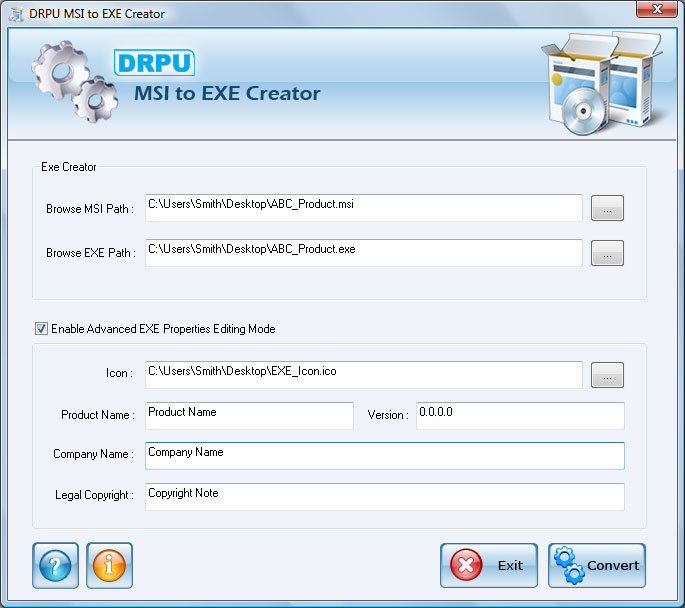
Create .exe file

MSI to EXE Creator is capable of creating .exe file from .msi (Microsoft installer) file easily and affordably. Setup Converter converts your .NET Framework MSI file into .exe (executable) file. Setup Creator software does not affect the original functionality of your application with .msi file extension. Software is capable of converting your default Visual studio .NET Framework MSI file into similar or equivalent .exe file format.

Setup maker facilitates user to save the created .exe file at user specified location on your storage media. Software is a valuable utility for Software developers, Programmers and Coders who have developed their application with .msi extension. Software is very easy to use and allow users to select .msi file and convert it into EXE format windows installer package.

Important Features
  • Software creates EXE setup file from MSI Windows installer file quickly.
  • Does not affect the original functionality of MSI application software!
  • Save the created exe file at specified location on your Computer PC.
  • Software is useful for software developers, programmers or any other user to create or build .exe setup file.
  • Software does not require any technical or non-technical skills to operate the software.

Software Capabilities
Explore the full features and capabilities of MSI to EXE Creator with freeware demo version. Free trial demo can be downloaded to analyse the working of software. Purchase full version to avail full functionality of software.


System Requirement
  • Windows VISTA (Vista Ultimate, Home Premium, Home Basic, Business, Enterprise) / XP (Home Edition, Professional Edition, Media Center Edition, Tablet PC Edition) / ME / 2000 / 2003 Server / 98 / NT operating system.
  • 10 MB of Free disk space
  • Minimum 128 MB of RAM

Download .exe creator.
In MAYA 0 Comments | Readmore...

Thursday, August 11, 2011

Windows Explorer and Internet Explorer Shortcuts

Windows Explorer Shortcuts :
ALT+SPACEBAR - Display the current window’s system menu
SHIFT+F10 - Display the item's context menu
CTRL+ESC - Display the Start menu
ALT+TAB - Switch to the window you last used
ALT+F4 - Close the current window or quit
CTRL+A - Select all items
CTRL+X - Cut selected item(s)
CTRL+C - Copy selected item(s)
CTRL+V - Paste item(s)
CTRL+Z - Undo last action
CTRL+(+) - Automatically resize the columns in the right hand pane
TAB - Move forward through options
ALT+RIGHT ARROW - Move forward to a previous view
ALT+LEFT ARROW - Move backward to a previous view
SHIFT+DELETE - Delete an item immediately (Permanent)
BACKSPACE - View the folder one level up
ALT+ENTER - View an item’s properties
F10 - Activate the menu bar in programs
F6 - Switch between left and right panes
F5 - Refresh window contents
F3 - Display Find application
F2 - Rename selected item

Internet Explorer Shortcuts :
CTRL+A - Select all items on the current page
CTRL+D - Add the current page to your Favorites
CTRL+E - Open the Search bar
CTRL+F - Find on this page
CTRL+H - Open the History bar
CTRL+I - Open the Favorites bar
CTRL+N - Open a new window
CTRL+O - Go to a new location
CTRL+P - Print the current page or active frame
CTRL+S - Save the current page
CTRL+W - Close current browser window
CTRL+ENTER - Adds the http://www. (url) .com
SHIFT+CLICK - Open link in new window
BACKSPACE - Go to the previous page
ALT+HOME - Go to your Home page
HOME - Move to the beginning of a document
TAB - Move forward through items on a page
END - Move to the end of a document
ESC - Stop downloading a page
F11 - Toggle full-screen view
F5 - Refresh the current page
F4 - Display list of typed addresses
F6 - Change Address bar and page focus
ALT+RIGHT ARROW - Go to the next page
SHIFT+CTRL+TAB - Move back between frames
SHIFT+F10 - Display a shortcut menu for a link
SHIFT+TAB - Move back through the items on a page
CTRL+TAB - Move forward between frames
CTRL+C - Copy selected items to the clipboard
CTRL+V - Insert contents of the clipboard
ENTER - Activate a selected link
HOME - Move to the beginning of a document
END - Move to the end of a document
F1 - Display Internet Explorer Help
In MAYA 0 Comments | Readmore...

Windows XP Keyboard Shortcuts

ALT+- (ALT+hyphen) : Displays the Multiple Document Interface (MDI) child window's System menu
ALT+ENTER : View properties for the selected item
ALT+ESC : Cycle through items in the order they were opened
ALT+F4 : Close the active item, or quit the active program
ALT+SPACEBAR : Display the System menu for the active window
ALT+TAB : Switch between open items
ALT+Underlined : letter Display the corresponding menu
BACKSPACE : View the folder one level up in My Computer or Windows Explorer
CTRL+A : Select all
CTRL+B : Bold
CTRL+C : Copy
CTRL+I : Italics
CTRL+O : Open an item
CTRL+U : Underline
CTRL+V : Paste
CTRL+X : Cut
CTRL+Z : Undo
CTRL+F4 : Close the active document
CTRL : while dragging Copy selected item
CTRL+SHIFT : while dragging Create shortcut to selected iteM
CTRL+RIGHT ARROW : Move the insertion point to the beginning of the next word
CTRL+LEFT ARROW : Move the insertion point to the beginning of the previous word
CTRL+DOWN ARROW : Move the insertion point to the beginning of the next paragraph
CTRL+UP ARROW : Move the insertion point to the beginning of the previous paragraph
SHIFT+DELETE : Delete selected item permanently without placing the item in the Recycle Bin
ESC : Cancel the current task
F1 : Displays Help
F2 : Rename selected item
F3 : Search for a file or folder
F4 : Display the Address bar list in My Computer or Windows Explorer
F5 : Refresh the active window
F6 : Cycle through screen elements in a window or on the desktop
F10 : Activate the menu bar in the active program
SHIFT+F10 : Display the shortcut menu for the selected item
CTRL+ESC : Display the Start menu
SHIFT+CTRL+ESC : Launches Task Manager
SHIFT : when you insert a CD Prevent the CD from automatically playing
WIN : Display or hide the Start menu
WIN+BREAK : Display the System Properties dialog box
WIN+D : Minimizes all Windows and shows the Desktop
WIN+E : Open Windows Explorer
WIN+F : Search for a file or folder
WIN+F+CTRL : Search for computers
WIN+L : Locks the desktop
WIN+M : Minimize or restore all windows
WIN+R : Open the Run dialog box
WIN+TAB : Switch between open items
In MAYA 0 Comments | Readmore...